
Building SAVON: a medicine app for Bangladesh that started as AmarMeds
Case study · October 2026
 .
.
At a glance
- Product: SAVON, an Android app for checking, comparing and remembering your medicines. It started life as AmarMeds.
- Market: Bangladesh, in English and Bangla.
- Medicine list: 21,713 Bangladeshi brands, with generic name, strength, form, maker and approximate price.
- Status: live on Google Play since 29 October 2026.
- Web: amarmeds.tech is the web side (medicine directory, search and health guides). savon.cloud is the app’s home page.
- Team: me, building solo.
The problem
In Bangladesh, the same medicine is sold under many brand names. One generic can have dozens of brands at very different prices, and the strip label doesn’t tell you what’s inside. Prescriptions are often handwritten, so even reading one can be hard. Once you get home, keeping track of several medicines a day, at the right times and before or after food, is its own job. Most of the information people need exists somewhere, but it’s scattered and mostly in English.
[Add: what made you start AmarMeds. A personal story, a family member, something you saw at a pharmacy. One short paragraph is enough.]
What the app does
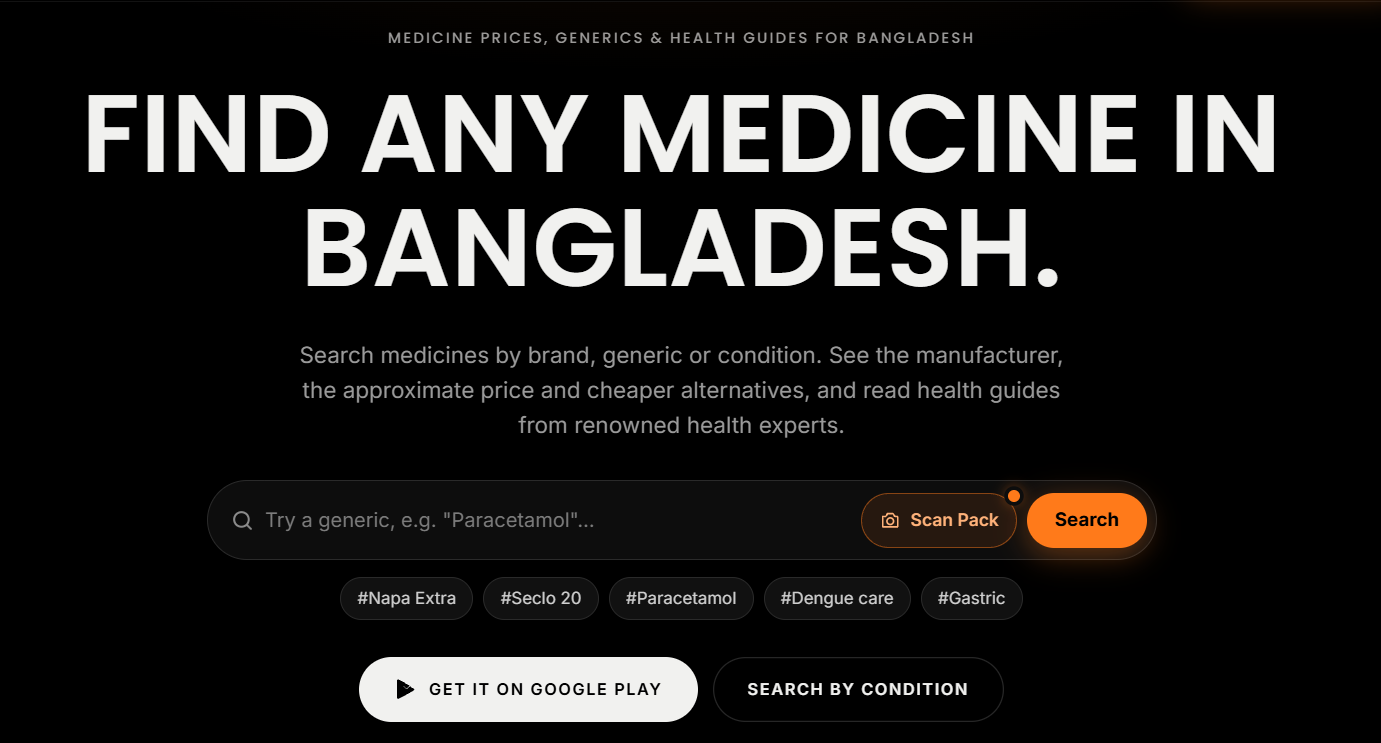
- Scan a medicine pack. Take a photo and the app tells you what it is: generic name, strength, form, maker, price, and what it’s used for.
- Search by name, in English or Bangla. Typing “নাপা” works the same as typing “napa”
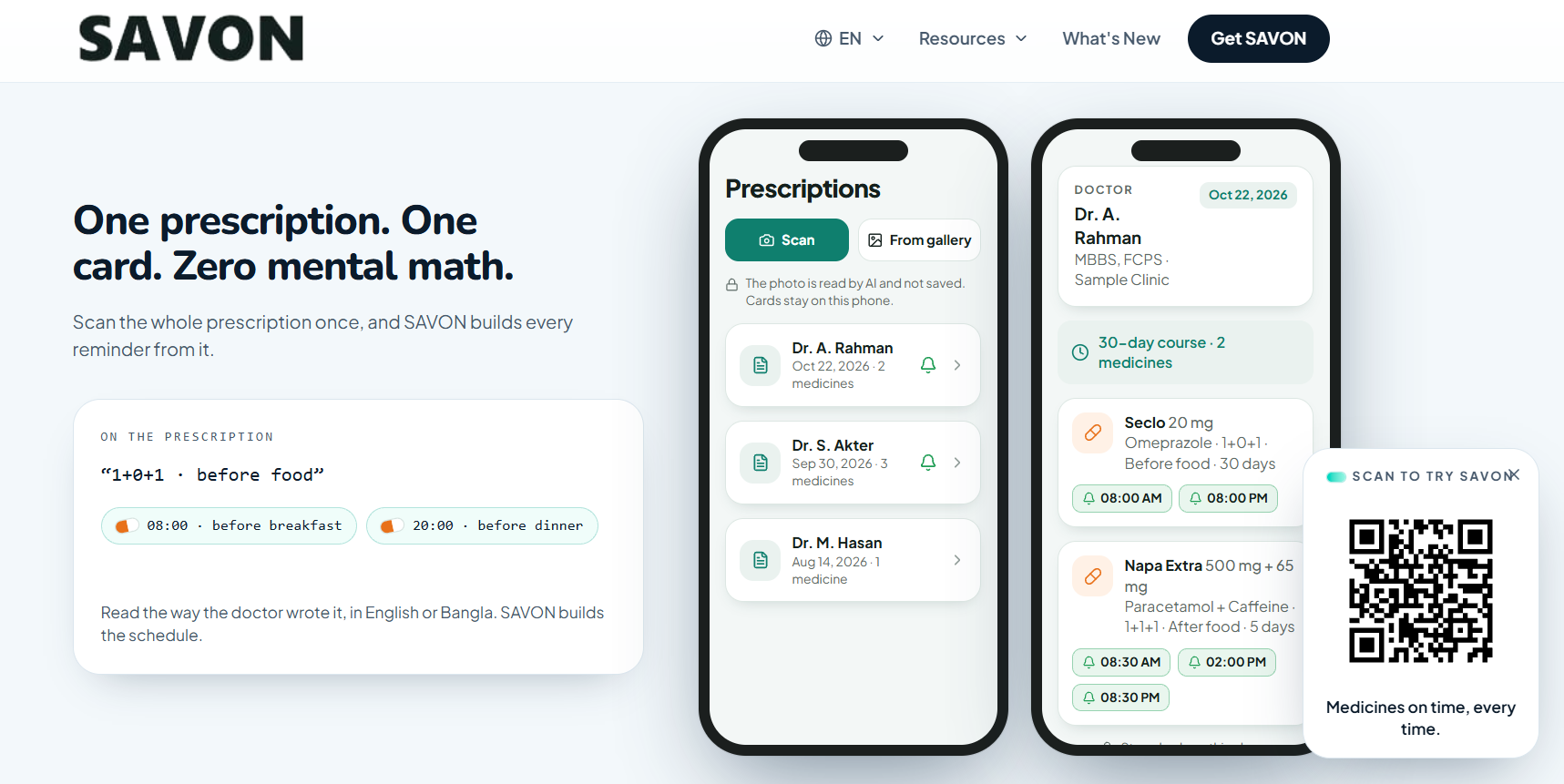
- Read a prescription. Photograph it, check what the app read and fix anything it got wrong (this step can’t be skipped), then tap Activate all alarms. Reminder times follow the prescription: before food, after food, or at bedtime.
- Find cheaper alternatives. Every result lists other brands with the same generic and strength, cheapest first.
- Alarms that actually ring. Medicine reminders ring like a real alarm clock. They’re heard in silent mode, show full screen over the lock screen, and have Taken and Snooze buttons. Doses due at the same time ring as one alarm.
- Stock and dose log. The app counts down your stock as you take doses and keeps a daily log.
- Health guides and Health A–Z. Short articles in Bangla and English that can be read aloud and saved for offline reading, plus 48 common conditions with the medicines usually used for them.
- Company logos. Results show the maker’s logo, for 108 Bangladeshi pharmaceutical companies so far.
Privacy: no accounts, your data stays on your phone
SAVON has no sign-up and no login. It opens straight to the home screen. Your medicine list, reminders, dose log, scan history and profile are stored on your phone, not on my server.
To be precise about what does leave the phone: a photo you scan or a name you search is sent to the server so it can be read and matched. Scans are saved without any name attached and deleted after 30 days, and the app never reads them back. The privacy policy and terms are at savon.cloud/privacy and savon.cloud/terms, in English and Bangla.
How it’s built
The app is built with Expo and React Native, Android first. It lives in one monorepo with the API, an admin console and the shared legal text, so the privacy policy in the app and on the web always match.
The API is a Node.js and Express server on a Hostinger VPS, behind nginx, with PostgreSQL 18. The medicine list sits in its own database that the API can only read. I edit it through the admin console.
Database first, AI second. This is the most important decision in the whole project. When you scan a pack, a local OCR service on the server reads the text first. That text is fuzzy-matched against the 21,713-brand list. If the brand is found, that’s the answer, and no AI is involved. The AI only gets the photo when the list doesn’t recognise the medicine. Typed searches work the same way: a close name match comes straight from the list.
AI providers. Google’s Gemini handles the scans and searches the list can’t answer. The free tier gives each Gemini model a small daily quota, so the server rotates through several models and skips any that are rate-limited. DeepSeek is a backup for text requests only, because it can’t read images.
Web. amarmeds.tech serves the medicine directory, search, Health A–Z and guides as normal web pages that search engines can index. savon.cloud is the app’s landing page, with the privacy and terms pages. Both run on the same server as the API.
Builds. Signed Android builds (APK for testing, AAB for Google Play) are made by GitHub Actions.
Challenges and what I learned
1. AI is slow, costs money, and can be confidently wrong
Early on, every scan went to the AI. That’s expensive, and for local brands the AI sometimes guessed. Moving to “database first” made common medicines faster, cheaper and more accurate, since the answer comes from a list of real Bangladeshi brands. When I added DeepSeek, a test search gave the wrong generic for a brand, so it stays behind Gemini as a backup instead of becoming the first choice. Lesson: use AI for the long tail, not for the things you can just look up.
2. Free tiers run out at the worst time
Gemini’s free quota is small per model, which is why the server rotates models. My Expo account also used up its free Android builds for the month right before an important release. Building on my Windows PC failed on long file paths. I moved the builds to GitHub Actions, where the first attempt ran out of disk space. It needed a step to free disk space and a limit on CPU architectures, and a full Play bundle for four phone architectures still takes about 50 minutes. Lesson: have a second way to build before you need it.
3. The alarm that wasn’t in the app
The alarm feature is a custom native module. For several builds the alarms quietly fell back to ordinary notifications, and nothing crashed. The cause was one line in a .gitignore: a rule meant to ignore the generated android/ folder also ignored the alarm module’s own Android code, so it never reached the build server. One character fixed it (android/ became /android/). I tested build 23 on my phone, the alarms rang, and the Play release went out as build 24. Lesson: check what’s actually inside the build, not just that the build succeeded.
4. Signing keys and version numbers
An update only installs over the existing app if it’s signed with the same key and has a higher version number. Every test build uses up a number, so I had to keep track: test builds 21 to 23 meant the next Play upload had to be 24 or higher. Lesson: write down the last version number you used every time you build.
5. Code in three places
At one point the live server was running newer code than the repository, and the newest app code was only on my office PC. A build from the repository would have shipped an old app. I copied everything into one branch and now build from there. Lesson: one source of truth, pushed before every build.
6. Don’t build on your production server
For a while I built Android apps on the same server that runs the API. In five days its disk usage went from about 8 GB to over 33 GB, mostly build tools and caches. Moving builds to GitHub Actions means all of that can be cleaned off. Lesson: the production server should only run production.
7. A rebrand touches everything
Changing the name meant the app name and icon, the store listing, the privacy policy and terms, the landing page, the website’s buttons and footer, and even the waitlist confirmation email, which still said “AmarMeds” after everything else had changed. Lesson: search for the old name everywhere, including emails and old pages.
[Add: why you renamed AmarMeds to SAVON.]
Launch
Before the Play listing was approved, savon.cloud ran a waitlist. Every download button opened a signup form instead of a direct APK download.
Google Play’s review needed two things worth knowing about. It needed a working privacy policy URL, which is savon.cloud/privacy. It also needed a declaration for the exact-alarm permission, which I answered as a medication reminder that has to ring at an exact time.
SAVON went live on Google Play on 29 October 2026. The same day, every waitlist and APK download button on savon.cloud was switched to the Play Store, the old direct APK links were taken down, and the download links on the amarmeds.tech homepage now point to Play too.
Results so far: [Add: installs, ratings and anything else you’ve measured since launch. I haven’t published any numbers yet.]
Timeline of the final stretch
- 20 Sept: scans and searches start answering from the medicine list first, and AI only when needed.
- 10 Oct: the app is renamed SAVON. New privacy policy and terms go live on savon. cloud. The SAVON icon and wordmark go into the app.
- 20 Oct: builds move to GitHub Actions. DeepSeek goes live as a backup AI. Company logos are added. The alarm bug is found and fixed.
The savon.cloud waitlist opens, and the Play bundle (build 24) is made. - 29 Oct: SAVON is live on Google Play, and the website download buttons are switched to the Play Store.
What’s next: ordering and delivery
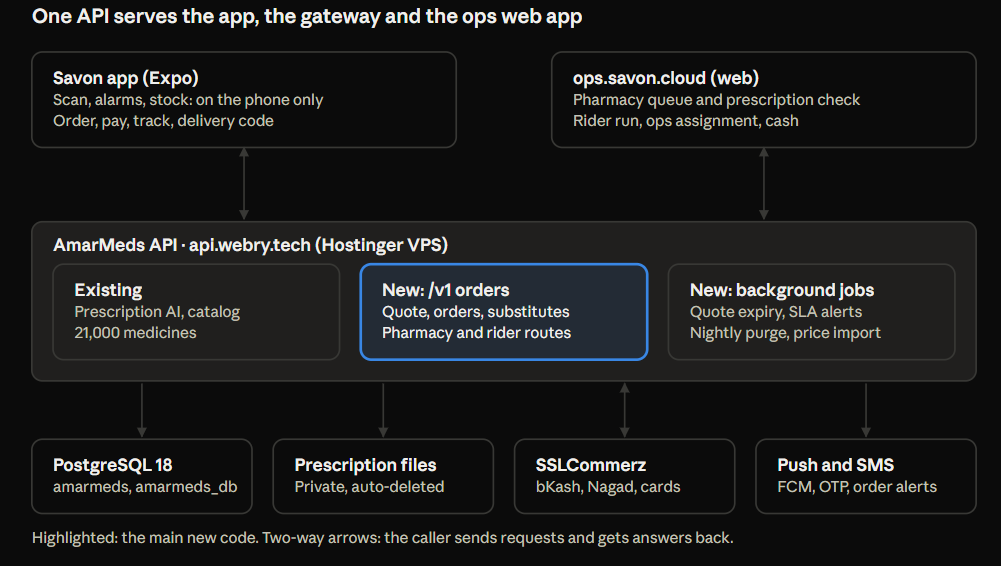
The next big step is letting people order the medicines on a scanned prescription, or refill when their stock runs low, and get them delivered. I’ve planned a small first version I can build alone in about six weeks:
- One area and one pharmacy. Mirpur 10 and the neighbouring areas in Dhaka, with one partner pharmacy, and delivery in fixed time slots.
- Payment by bKash, Nagad, card or cash on delivery, through one payment gateway. The server confirms each payment with the gateway directly. The app never decides that an order is paid.
- A pharmacy dashboard to check prescriptions, confirm what’s in stock and suggest substitutes, which the customer approves.
- A rider view for pickups and deliveries, with a 4-digit code the customer gives at the door.
- Stock updates. After delivery, the medicines are added to the stock on the phone, once, after the user confirms.
The privacy rule stays the same: nothing about your medicines leaves the phone until you tap Order. The server keeps order details only as long as it needs them, and the plan deletes the personal parts (address, phone, prescription photo) a couple of weeks after delivery. There are still no user accounts.
Before any of that, I’m cleaning up the server: freeing disk space, setting up off-server backups and adding monitoring. Pharmacy partner, delivery fees and the SMS provider are still open decisions.
Closing
SAVON is a small app built by one person, and most of the work went into things nobody sees: getting answers from a real medicine list instead of guessing, alarms that ring when the phone is on silent, and keeping people’s health data on their own phone. If you’re in Bangladesh, you can get it on Google Play. I’d like to hear what you think.